Email Open Rate: What It Is and What Counts as Good
Updated 9 min read

Table of contents
Your email open rate is the share of delivered emails that people opened. Recent benchmark reports put the average for marketing emails anywhere from 21% to 43%, largely depending on whether Apple Mail's automatic opens are counted. If you send personal emails from your own Gmail to a small list, your own past sends and your replies tell you more than any benchmark.
What is an email open rate?
An open rate tells you how many of the people who got your email opened it. Email tools count an open with a tiny, invisible image placed in each message. When the person opens the email and the image loads, the tool records an open.
The formula is:
Open rate = emails opened ÷ emails delivered × 100
"Delivered" means sent minus bounced. Say you send 50 emails, 2 bounce, and 18 people open: 18 ÷ 48 = 37.5%.
Mailchimp counts unique opens, so a person who opens your email five times counts once. YAMM calculates your open rate as emails opened divided by emails that were tracked and delivered. It also counts a click, a reply or an unsubscribe as an open.
It works like a read receipt, but counted across your whole list instead of one email at a time.
What is a good open rate for email?
Each big email platform publishes its own average, and they don't agree:
| Report | Average open rate | Period and sample | How it's counted |
|---|---|---|---|
| MailerLite | 43.46% | December 2024 to November 2025, over 3.6 million campaigns | Median, opens ÷ recipients |
| ActiveCampaign | 39.26% | January to December 2025, all customer campaigns | Average |
| Mailchimp | 35.63% | Up to December 2023, campaigns sent to 1,000 or more subscribers | Unique opens |
| Brevo | 33.87% with Apple MPP opens; 20.73% without | 2025, over 175,000 customers | Average, published both with and without Apple MPP opens |
| Klaviyo | 31% | 2026 report, over 183,000 brands, mostly ecommerce | Campaigns; automated flows average 32.2% |
| Campaign Monitor | 21.5% | 2021 | Opens ÷ subscribers |
The numbers are 22 points apart, for four reasons:
- Year. Campaign Monitor's 21.5% is from 2021, the year Apple announced Mail Privacy Protection, which marks emails as opened in its Mail app. The newer reports all come in higher.
- Median or average. MailerLite's figure is the median — the middle campaign — rather than a mean across campaigns.
- Who sent the emails. Klaviyo's report covers only ecommerce brands, in categories such as clothing, electronics and toys. Mailchimp only counted campaigns sent to 1,000 people or more.
- What counts as an open. Each tool decides for itself, and some don't say how. Brevo publishes both ways of counting the same 2025 campaigns: 33.87% with Apple Mail Privacy Protection opens, 20.73% without them. That one choice moves the average by 13 points.
For a large newsletter list, those reports give rough answers, once you know which way your tool counts. Is a 25% open rate good? It's above Brevo's average without Apple MPP opens, and below every average that includes them. Is 35% good? That's about average on the numbers that include MPP opens. The 37.5% in the example above would sit above most of them, and below MailerLite's median and ActiveCampaign's average.
These are newsletter numbers. If you send to 20 people, one open moves your rate by 5 points. Two merges that look 10 points apart can differ by two people. With a small list, don't read too much into the percentage. Look at who opened, row by row.
Average email open rates by industry
Three of the reports above break their 2025 figures down by industry. Here they are side by side, including the schools and nonprofits YAMM sends a lot of mail for:
| Industry | MailerLite (2025) | ActiveCampaign (2025) | Brevo (2025, without / with Apple MPP) |
|---|---|---|---|
| Consulting and agencies | 45.96% | 39.08% | 22.74% / 34.37% |
| Education | 43.98% | 39.06% | 22.25% / 34.19% |
| Entertainment and events | 46% | 38.17% | 21.26% / 37.45% |
| Finance | 43.34% | 37.74% | 21.30% / 32.38% |
| Government | 48.52% | — | 34.19% / 46.60% |
| Health | 43.75% | 41.48% | 19.47% / 34.28% |
| Media and publishing | 42.97% | 43.16% | 21.29% / 34.34% |
| Nonprofits | 52.38% | 42.68% | 27.03% / 40.52% |
| Real estate | 40.37% | 39.87% | 20.32% / 35.53% |
| Retail and ecommerce | 32.67% | 35.66% | 15.50% / 30.02% |
| Software and tech | 39.31% | 36.20% | 20.68% / 30.98% |
| Travel | 30.10% | 40.87% | 19.96% / 32.14% |
The category names don't match exactly between reports — "higher education", "online training" and "education" are the same row here — and Brevo's pair of figures shows how much of the gap between columns is counting, not reading. So compare each figure with its own report's overall average rather than across reports. On that basis, one pattern holds in all three: nonprofits sit near the top, and ecommerce near the bottom.
Why email open rates are inflated (and what they miss)
An open rate counts images that loaded, not people who read. Some things load the image when nobody read the email. Others stop it from loading when someone did.
What adds opens nobody made:
- Apple Mail. Since 2021, Apple's Mail Privacy Protection downloads an email's remote content, such as images, "regardless of whether you engage with the email," Apple says. In September 2026, 76.56% of the over 1.5 billion opens counted by Litmus were labeled Apple. That's the share of tracked opens, not the share of people. MailerLite says the same: "real open rates are lower than the metrics you see in your dashboard."
- Security scanners. Some company email systems check links before delivering a message. Microsoft Defender, for example, scans links "prior to message delivery." When a scanner clicks a link, YAMM counts that click as an open.
- You. Opening the email from your Sent folder counts as an open. So does opening a bounce notice, because it contains your email.
- Forwards and copies. If the person forwards your email, or you add someone in Cc or Bcc, their opens count too. They share the original recipient's tracking image, so those opens land on that recipient's row.
- Preview panes. A preview pane that loads images can add an open each time the email scrolls past, even if nobody stops to read it.
What hides opens that happened:
- Images turned off. In Gmail, anyone can choose "Ask before displaying external images." If they don't show images, the open isn't recorded.
- Long emails. Gmail cuts off emails above 102KB. The tracking image sits at the end, so it only loads if the reader clicks "View entire message."
- Tracking blockers. Apps and browser add-ons can stop the tracking image from loading.
- The spam folder. A read there is unlikely to load images, so it usually goes unrecorded.
Google's own sender guidelines say "Google doesn't track open rates," and that low open rates "aren't necessarily an accurate indicator of deliverability or spam classification issues." If you think your emails land in spam, check whether your emails are going to spam directly instead.
Email response rate: the number to watch instead
When you send personal emails from your own Gmail, such as a note to parents, an invitation or a request to clients, the number to watch is replies. They are usually the clearest sign of interest in a mail merge.
YAMM's response rate is emails replied to divided by emails delivered. It counts a reply when a message lands in the same Gmail conversation as the email you sent. An out-of-office auto-reply in that conversation doesn't count, and neither does a new email the person sends you outside it.
For a mail merge, read your results in this order:
- Replies. Who answered, and what they said.
- Clicks, if you included a link (keeping in mind that scanners can click too).
- Opens, as a rough sign that the email arrived and the subject line worked.
Whichever number you read, compare it with your last merge to the same people. That's the benchmark that counts.
How to increase your email open rate
- Write a clear subject line of about 50 characters, so it isn't cut off on a phone. Say what the email is about, use the person's name when you can, avoid all caps and check for typos. Our subject line tester shows how yours looks in an inbox.
- Make the first lines count. The inbox shows them next to the subject line, so open with the reason you're writing.
- Follow up with people who didn't reply, rather than only those who didn't open. A "didn't open" list leaves out everyone Apple Mail marked as opened. See how to write a follow-up email after no response.
How to track email open rate in Gmail and Google Sheets
YAMM sends your Gmail draft to everyone on a Google Sheet and writes opens, clicks, replies, bounces and unsubscribes back to the sheet. Tracking is included on every plan.
- Write your email as a draft in Gmail.
- In your Google Sheet, go to Extensions > Yet Another Mail Merge: Mail Merge for Gmail > Start Mail Merge.
- Select Track emails opened, clicked or bounced, then send.
- The tracking report opens in a sidebar on the right of your sheet. While it's open, the Merge status column shows EMAIL_OPENED, EMAIL_CLICKED or RESPONDED for each person as it happens.
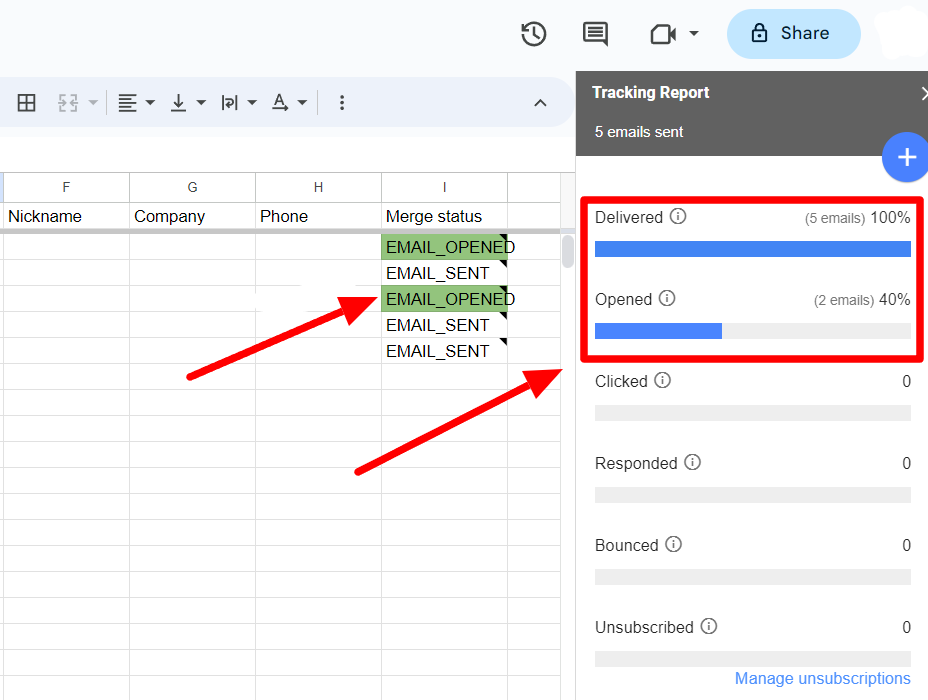
Because the results sit next to each name, a follow-up is a filter: sort by Merge status and you know who to write to again. To open the report later, go to Extensions > Yet Another Mail Merge: Mail Merge for Gmail > Open tracking report.
Then judge the result against your last merge to the same people, replies first. That comparison tells you more than any published average. If you don't use YAMM yet, you can install it from the Google Workspace Marketplace and track your first merge from your sheet.