Anti-spam rules: How to avoid spam filters and being blocked by Google
Follow the mail merge rules from this article to reduce your chance of being blocked by Google or getting spam complaints.
Before sending a mail merge, please make sure to comply with Gmail Bulk Senders Guidelines
You are allowed to send bulk emails only to recipients who agreed to receive emails from you. Otherwise, they can report your email for abuse, even if you think that your email is legitimate and targets the right audience.
Learn more in this following article: What is spam? How is your email marked as spam?
1. 'Warm-up' your Google account
Google will carefully monitor your usage if you are using a new Google Workspace or Gmail account to send a campaign.
We recommend to warm up your account:
-
Start sending your emails to a small list of recipients (e.g. <50 emails)
-
Track your mini-campaign to see how your recipients react to your emails
If you receive a lot of bounces or undeliverable messages, double-check your contact list again. This means that your database is outdated or not legitimate.
Check our documentation about bounce issues: 'Bounce Rate'.
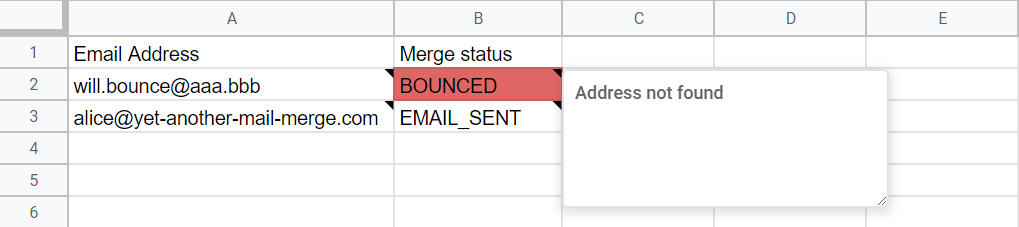
Please use your account wisely when sending bulk emails. Otherwise, you will be blocked by Google. If you are facing this issue, please check this article: 'My account has been blocked by Google'
2. Use a double opt-in method and avoid using or purchasing an online database
| Do's | Why? |
|---|---|
| Double opt-in method | To get explicit authorization from your recipients: They should always give you their permission before emailing them. |
| Send a confirmation email to the subscribers | Once someone has signed up to your website, he should get a confirmation email that contains a link where he can click to activate the account. |
| Be sure to collect only valid email addresses | To reduce the number of undeliverable addresses: What are bounces? How to track the bounce rate? |
| Single opt-in method: use this method wisely | Their permission is less explicit because they won't receive the confirmation email. |
| Don'ts | Why? |
|---|---|
| Use or purchase a list of email addresses from an online database | Most of the time these lists have been bought by unscrupulous companies without the consent of the accounts' owners (and even without them knowing it!) |
| Sending emails to this list | The recipient will mark your email as spam, and spam filters will collect all the abuse reports. In the end, it will only harm the reputation of your domain/company, and, in the future, your email will be much more likely to be flagged as spam againeven if you corrected your emailing behavior with better practices. |
3. Don't assume that people gave you their permission
Most of the time, email marketers use subjective criteria to assume that people allowed them to send emails.
| Do's | Don'ts |
|---|---|
| If you met your customers at a trade fair, ask them directly if they want to receive messages from you (e.g., By filling a paper form.) If you are managing an online shop, add a checkbox to subscribe to your news when they sign-in your website. | Even if when they explicitly exposed their contact details online (e.g., On LinkedIn or others social networks), don't infer that they allowed you to send them emails, especially when it is about promotional emails. |
4. Indicate to your subscribers the nature and frequency of your email / clean your database
| Do's | Don'ts |
|---|---|
| Your consumers should know on which basis (weekly? / monthly?) they are going to receive your email, and what is the main topic (if you are planning to send different types of emails depending on your business activity). | Make sure to respect what you are saying to your subscribers. Don't send them too many emails (if they prefer monthly newsletters) or promotions that are not of their interests. |
| Segment your subscriber's list into smaller categories to better tailor your email and increase your efficiency. | |
| Clean regularly your database | Sending your emails to a stale and deprecated contact list will lead you to get high hard bounce rates, and poor results for your campaign (low open/click rates). Learn more about it: What are bounces? How to track the bounce rate? As Google is very sensitive to your delivery rate and closely checks this parameter in your Gmail inbox, if you are sending a large number of undeliverable messages, Google will block your account without any notice as this is not compliant with their rules. If you encounter this issue, read the following article: My account has been blocked by Google |
5. Don't wait too long before contacting your subscribers
| Do's | Why? |
|---|---|
| While transactional emails (welcome email, purchase confirmation, invoice etc.) are expected right after a specific action (signing-up, purchasing a product etc.), newsletters and bulk emails have to be planned and integrated them into your marketing strategy. | If you are sending the first newsletter 6 months after their last purchase, your subscribers might have probably forgotten you, so flag your email as spam or unsubscribe. All your previous efforts to build and maintain an up-to-date database are thus almost gone … |
6. Be consistent in your emails with your brand image
| Do's | Don'ts |
|---|---|
| Always to keep the same brand image in your emails so that your subscribers can more easily recognize them. By 'brand image', we are mainly talking about the design guidelines, the logo, the messages conveyed to your customers (and how they understand them), the tons etc. of your organization. | If you are getting too far away from your brand image, people will get confused and wouldn't want to be more engaged with you through your emails. |
7. Insert a clear unsubscribe link to your email
| Do's | Why? |
|---|---|
Insert a clear unsubscribe link to your email: 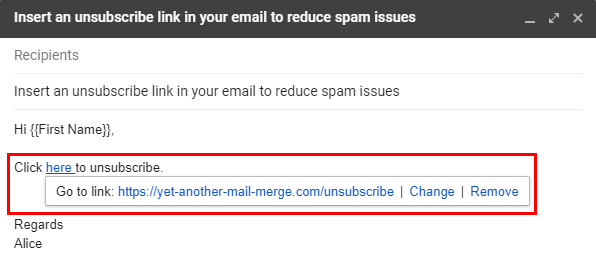 | If you don't clearly offer them the possibility to unsubscribe, they will click on the 'Mark as Spam' button, which has consequences on your domain and reputation.  |