YAMM doesn't merge the information from {{markers}}
In some cases, YAMM doesn't merge the information from Google Sheets to the sent emails. This is typically due to HTML tags in your draft that are breaking the markers. This article explains how to solve this issue.
Adding {{markers}} (or <<markers>>) in your Gmail draft is easy. But if you edited your draft a lot (or created your draft in another app), it might contain some invisible HTML tags that break YAMM's ability to search & replace markers.
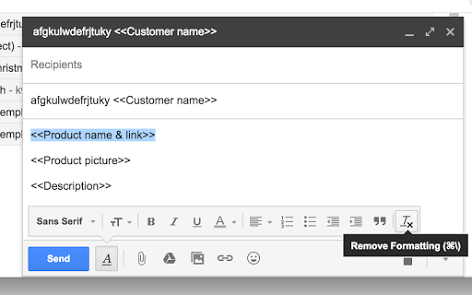
In that case, select the faulty marker in your draft and click the 'Remove Formatting' button in the Gmail draft editor. This action removes all invisible HTML tags which are causing issues.
To learn more about markers, see Personalize your email body with custom fields and markers.