[GDPR] How to collect consent from your recipients?
If your company is based in the European Union (EU) or process individuals' personal data in the EU, you must meet the EU data protection regulations and GDPR. General Data Protection Regulation (GDPR) mandates that you collect explicit & affirmative consent first from your recipients before emailing them. In this article, we share our suggestions and various options of YAMM that can help you with consent management (both opt-in and opt-out).
YAMM commitment for GDPR
Being your favorite tool for sending personalized emails, YAMM is fully committed to its compliance for GDPR. Please find our reassurance of your data's safety with YAMM in our detailed articles on Data Security and Policy and YAMM's GDPR compliance FAQ.
We are equally committed to providing you with a tool that may help you comply with the regulation. Below are some of YAMM features that can be used to manage opt-in consents (opt-ins) from your contacts/subscribers and ways to mention and manage consent withdrawals (opt-outs).
The information provided in this article is not legal advice for you or your company to comply with EU data privacy laws like GDPR.
Importance of user consent in GDPR
With GDPR's on and live, you must have explicit consents (if not received in the past) from your subscribers for their interest to receive emails from you.
That means for you, as per Article 6 (lawfulness of processing) & Article 7 (conditions for consent) from GDPR, that:
-
Your subscribers' consents should be freely given, specific, informed, and unambiguous, for you to process their data for the particular purpose mentioned by you.
-
Once received, you must keep a record of their consents. It means that you must store who, when, and for what purposes they gave their permissions (opt-in) before sending them any email communication.
-
Your recipients must also be clearly informed on how they can withdraw their consent (anytime they wish to) and if their emails are tracked for better engagement. In case they opt-out, their unsubscription has to be duly recorded and managed during future campaigns.
So GDPR makes it clear that you should never send an email campaign (newsletter, prospection etc.) to someone who didn't explicitly agree to receive communications from you.
Managing Opt-ins with YAMM
Whether you want to ask for opt-in (in case of no consents received earlier) or re-affirm past permissions in the GDPR suggested format, we recommend two ways of managing your opt-ins:
GDPR friendly Google consent opt-in form
If it's the first time you are emailing your contact list, you may start with our sample Google Form for GDPR opt-in consent, as a base and add specific questions to suit your business, before you collect their consent.
Once your subscribers send their opt-ins, all their responses can be stored in a single Google Spreadsheet linked to this form, which can serve as your consent database.
For example: For your marketing efforts, you may seek for your subscribers' permissions to receive your newsletter, promotional and offer emails, etc.
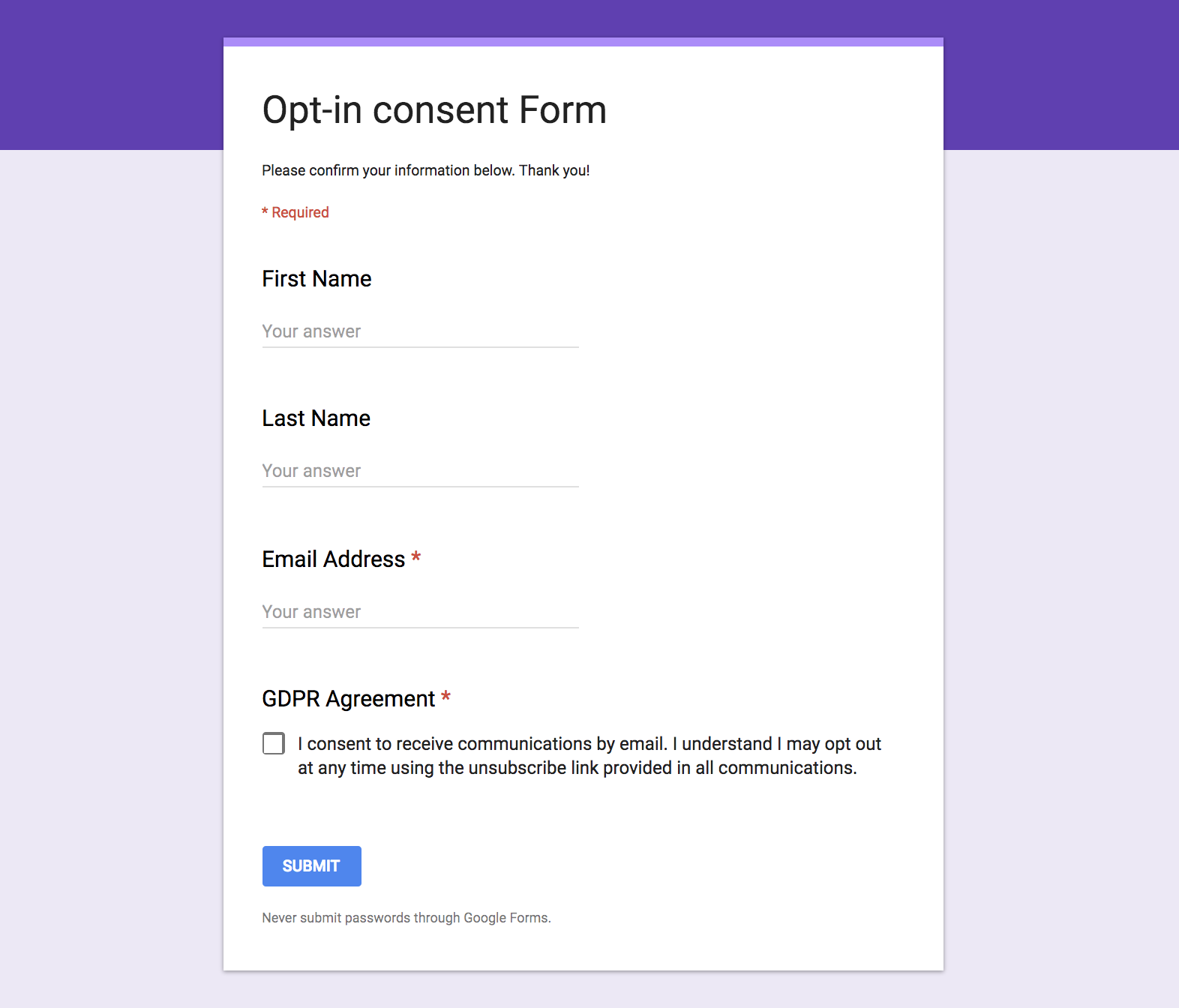
Copy GDPR Form
Once you copied our opt-in consent form, click 'Send' at the top right corner.
A pop-up will open. Enter your recipients, check 'Include form in email' and click 'Send':
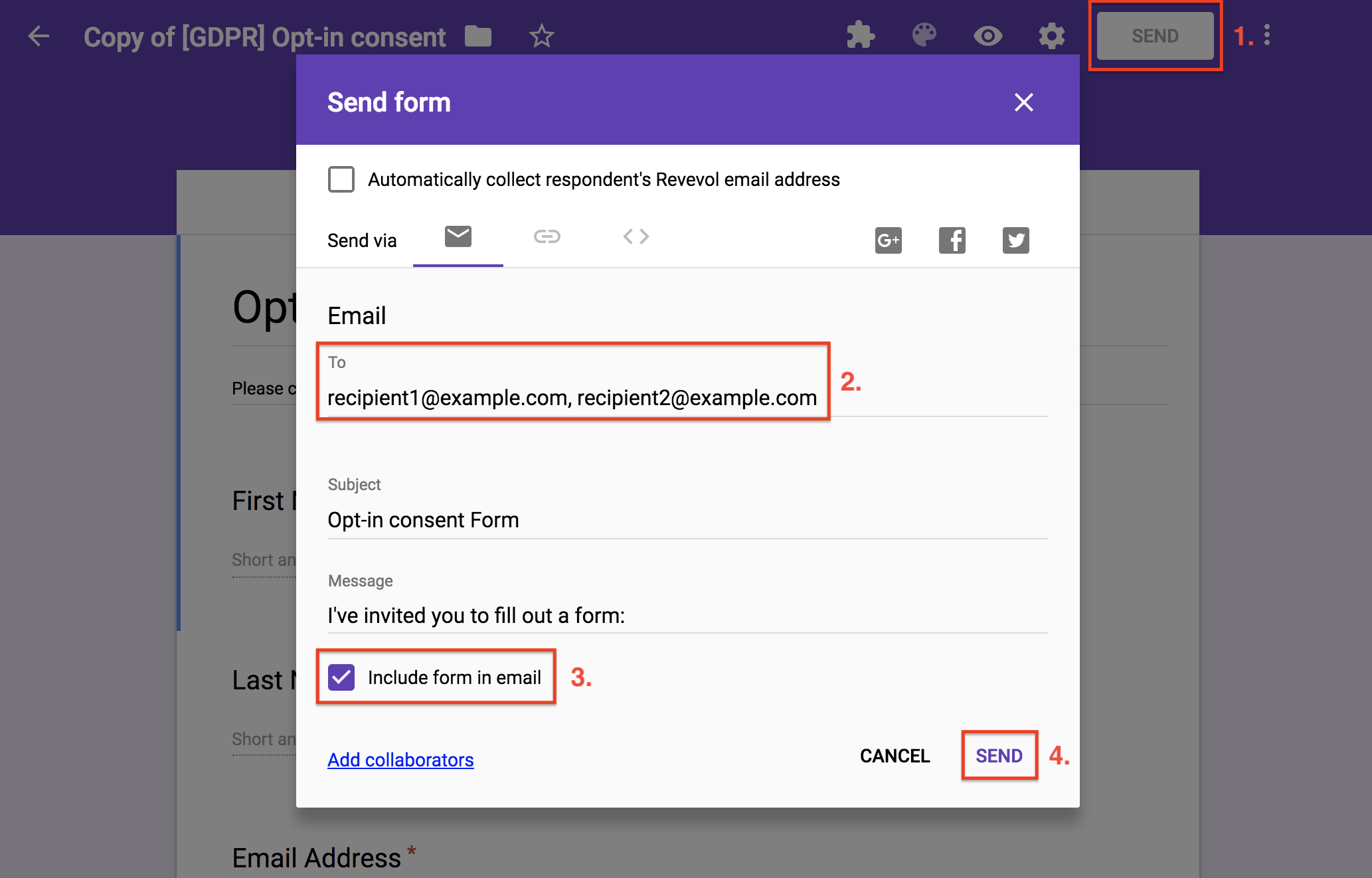
Don't pre-tick the GDPR Agreement box! Pre-checked boxes that use recipient inaction to assume consent are NOT valid under GDPR.
Embed a Yes/No YAMM Poll
You can use a YAMM poll with a simple Yes/No question to quickly collect your recipients' consent.
For example, insert the following question:
'Do you want to receive further communications? Yes / No'
Please read our tutorial: 'YAMM Polls - Your assistant for greater and faster feedback'.
Their responses (consents) are stored in a separate column against your subscriber email address in your consent campaign spreadsheet.
This option to collect consent requires the activation of our tracking tool.
Managing Opt-outs with YAMM
You must communicate to your subscribers how they can withdraw their consent at any time. It is also a standard best practice to state if their emails are tracked and leave an unsubscribe link for them if they wish to discontinue from receiving your emails.
Insert an unsubscribe link to your email
Mandatory in some countries, we highly recommend inserting an unsubscribe link at the bottom of your email template.
Please read our tutorial: 'Insert an unsubscribe link in your email to reduce spam issues'
You should make it easy for your recipients to withdraw their consent.
For example, write a standalone, normal-sized, bolded and underlinedlink to 'Unsubscribe', or 'Click here to unsubscribe'.
These unsubscriptions are recorded on your spreadsheet in real-time under the 'Merge status' column and in your list of unsubscriptions, which you can manage. You can use this list to mark withdrawn consents in your consent database.
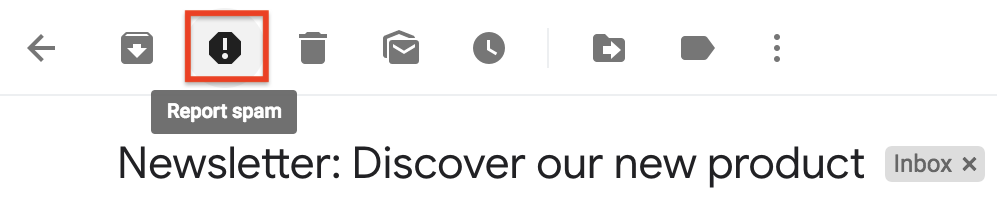
If you are trying to hide this unsubscribe link (font-size too small, not visible enough etc.), you're increasing the risk for your recipients to click on the 'Report spam' button instead:
This option to collect consent requires the activation of our tracking tool.
Add a disclaimer at the bottom of your email
If you are tracking your email campaign, we invite you to add an informative message at the bottom of your email, such as:
'This email is being tracked, if you don't want to receive more email from us or if you don't want to receive emails that are tracked, please unsubscribe.'
We wrote a detailed article explaining how YAMM tracks your campaign stats: '[DATA STORAGE] How does YAMM email tracking work?'
This option to collect consent requires the activation of our tracking tool.
Be aware of the anti-spam rules
It is obvious, and as discussed earlier, you should never send an email campaign to someone who didn't explicitly agree to receive communications from you.
If you are not respecting this rule and keep sending unsolicited emails, then it means that you are spamming your recipient list.
We invite you to read the following articles and respect anti-spam rules:
If at least 10 recipients report your email as spam, your email quota will be temporarily reduced by Google and your emails will bounce. If that happens too often, Google will disable your account.