Why was your mail merge stopped?
Why was your mail merge stopped?
You were sending a mail merge and before it was done it stopped, and the following message appeared:
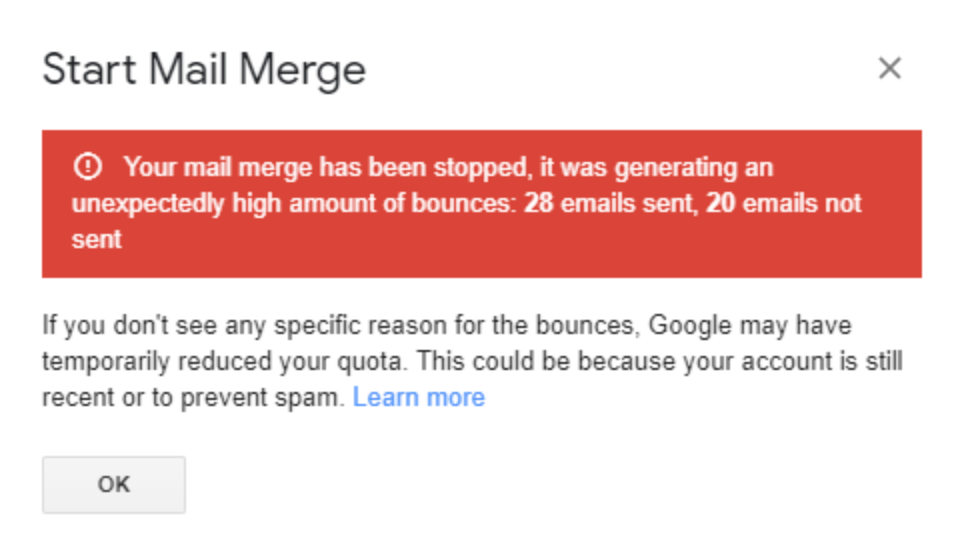
An unusually high amount of bounces was detected by YAMM, so your mail merge was stopped to avoid Google rate-limiting or deactivating your account.
Check the list of reasons for bounces here: What are bounces? Why do I get bounces? If none of those concern you, you might have reached your Google account sending limit.
Why is your sending limit lower than you expected?
| Common reasons | Explanations | Learn more |
|---|---|---|
| You exceeded your daily sending limit | - You are sending emails via POP/IMAP - You are signed in with the wrong Google account - You are using other mail merge tools | Read this article: I don't have quota left / My quota didn't reset |
| You exceeded the limit of 10 recipients being marked as spam | Google temporarily reduces your quota if: - More than 10 recipients in your target list marked your email as spam - More than 10 emails fell into your recipients' spam folder (without even reaching your recipients' inbox) | Make sure to follow the basic anti-spam rules: Tips: How to avoid being blocked by Google or spam filters |
| Your account is recent and you have sent too many emails too quickly | Google might get suspicious about your activity if, after you created your account, you immediately started to send emails to many recipients. | Read these articles: - Google documentation: Limits for sending and receiving mail - What is spam? How is your email marked as spam? - Tips: How to avoid being blocked by Google or spam filters |
warning
The quota renewal is entirely handled by Google. If Google rate-limits your account, there is nothing we can do to reset it. However, we can help you understand and detect some reasons of this issue if you send us a request. If you want to reset your quota, we suggest contacting Google support directly.