What’s a space?
A space in YAMM is an entity containing one or more members.
Gmail.com accounts are limited to one seat and cannot add members or manage a team. These capabilities are only available for Google Workspace accounts.
-
On a Free plan, your space includes only you.
-
On a Pro plan, your space includes one or more members. Each member needs a seat to access Pro features.
What’s a seat?
A seat is a paid slot in a space under a Pro plan. Each seat lets one space member access Pro features.
To access Pro features, you can either:
-
Upgrade your space, and buy one or more seats
-
Join someone else’s space using one of their seats
Roles in a space
On a Pro plan, YAMM space members can have one of three roles, Owner, Admin, or Member. Each role has different permissions:
| Role | Send mail merges | Add / Remove members | Assign roles | Transfer ownership | Manage billing |
|---|---|---|---|---|---|
| Owner | Yes | Yes | Yes | Yes | Yes |
| Admin | Yes | Yes | No | No | No |
| Member | Yes | No | No | No | No |
Multiple spaces: which one sends your mail merges
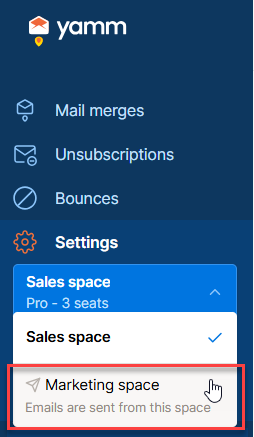
If you belong to several spaces, YAMM always uses the most recently joined space to send your mail merges. You can’t choose which space to use, YAMM picks it automatically based on your join history.
You can see which space sends your mail merges by clicking on the space names in the sidebar.
To send mail merges from more than one space, use separate Google accounts. These accounts must use different email addresses; aliases won’t work.