[DATA ACCESS] What permissions are needed to use YAMM?
Suppose your organization enforced strict security rules to protect your data or your customers' data. In that case, you want to ensure that you are compliant with the level of expectations from your client/company when using YAMM. This article explains what permissions are needed and why.
Permissions always requested at installation
Yet Another Mail Merge, as an add-on for Google Sheets, is well integrated within Google Workspace apps like Google Sheets, Gmail, Google Contacts and Google Drive. It requires access to the Google environment to provide its services seamlessly across the Google Workspace apps.
The following permissions are necessary for YAMM to function and are requested during installation. By reviewing the permissions and clicking on Allow, you signify your acceptance of the Terms of service and Privacy Policy of Yet Another Mail Merge.
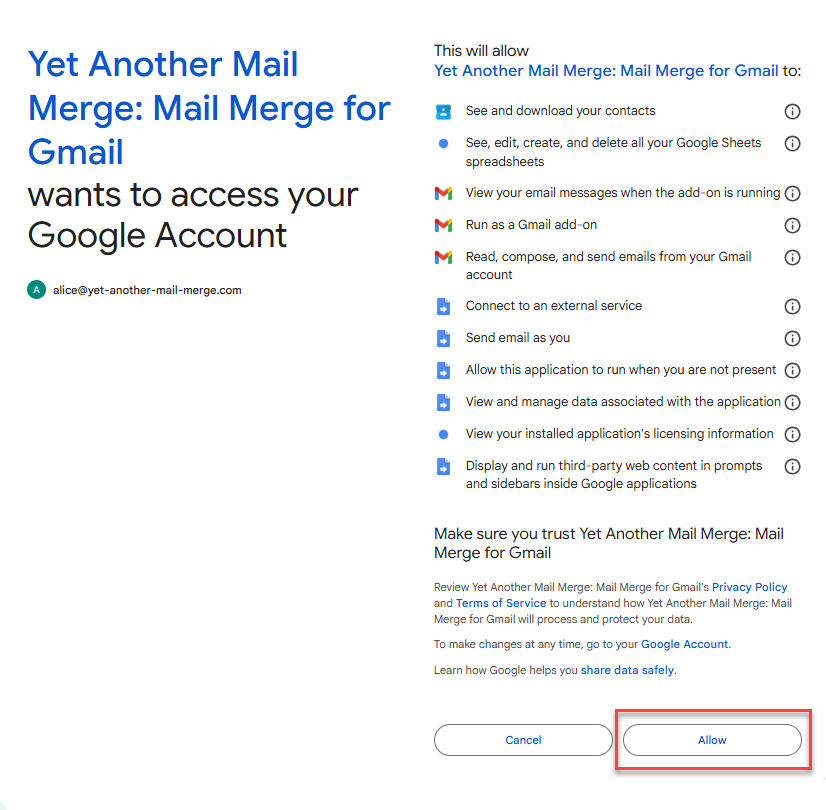
| Permission scope | What does it mean? | Why does YAMM need this? | |
|---|---|---|---|
 | See and download your contacts | This scope is required to import contacts. | YAMM needs access to your contact list: - To import contacts from Google Contacts |
 | See, edit, create, and delete all your Google Sheets spreadsheets | Many essential functions are done from within your Google Sheets (writing in your spreadsheet, adding filters to segment your recipient list etc.). | YAMM needs total access to your spreadsheets: - To segment your list - To send emails to specific people/rows |
 | View your email messages when the add-on is running | This scope is required to read email messages, only when the add-on is running. | - To display mail merge information when you open an email in Gmail |
| Run as a Gmail add-on | This scope is required to run an application as a Gmail add-on, which is triggered when you open your email. | - To run YAMM from the sidebar of your Gmail inbox |
| Read, compose, and send emails from your Gmail account | This scope is required to create, read, update, and delete drafts. Also, to use your drafts to send messages. | - To retrieve a draft in Gmail - To apply Gmail labels on emails sent |
 | Connect to an external service | This scope is required to send/retrieve information from Firebase, a real-time database from Google. Even if this authorization is described as an 'external service', it still stays within Google environment. | - To create user profiles, with basic information on their YAMM usage - To connect to Google Analytics |
| Send email as you | This scope is required to send emails. | For the very core function of YAMM: - To send your email campaigns To know more: [DATA PROCESSING] How are your emails being sent out? |
| Allow this application to run when you are not present | This scope is required to send emails later, to track your emails, to send email notifications on Form submissions or trigger. | - To use the schedule option - To update your tracking report in real-time when your PC is switched off - To send notifications on Form submission or triggers |
| View and manage data associated with the application | This scope is required to read and write application-related data. | - To store settings and user preferences |
| View your installed application's licensing information | This scope is required to check the licensing status of applications installed from G Suite Marketplace. | - To compute installation metrics |
| Display and run third-party web content in prompts and sidebars inside Google applications | This scope is required to display sidebars inside Google applications. | As YAMM is displayed inside Google Sheets, the access is needed: - To display the tracking report sidebar - To display the form submission notification sidebar |
If you deny the authorizations, you won't be able to use YAMM.
Permission only requested when using personalized attachments
The following permission is only requested if you set up YAMM to use personalized attachments.
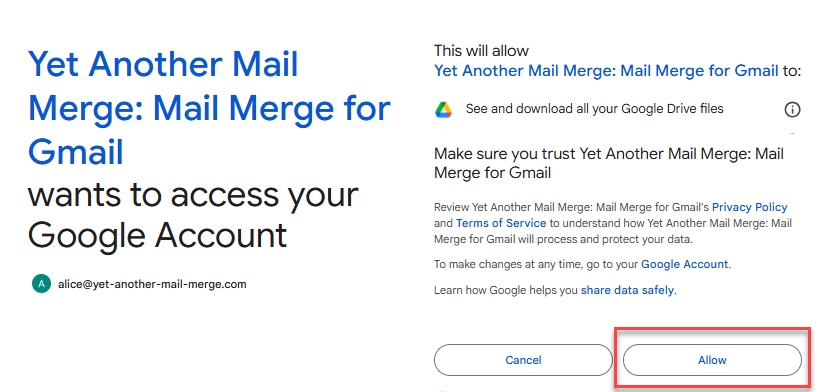
By reviewing the permission and clicking on Allow, you signify your acceptance of the Terms of service and Privacy Policy of Yet Another Mail Merge.
| Permission scope | What does it mean? | Why does YAMM need this? | |
|---|---|---|---|
 | See and download all your Google Drive files | This scope is required only to retrieve personalized attachments uploaded in Drive folder. | - To retrieve personalized attachments from your Google Drive - To include them in your mail merges |
Review of permissions
Should you need to review the permissions you granted for YAMM, you can check it under Security settings of your Google Account at any time.
How safe is your data?
We commit ourselves to use these permissions only to be able to offer you the service that you have signed up for.
YAMM requires full access to your Google Sheets spreadsheets and Gmail inbox only to allow actions to be performed on your behalf. In no case the content of your spreadsheets and emails are stored or will be used for any other purposes or shared with any third-party services.
YAMM can't access your Google account or your password at any time.
Beyond this, YAMM stores your name, email address and collects some usage information as you use YAMM. You can read a detailed article on this here: '[DATA STORAGE] How and which data do we store?'
Granting explicit access to your Google Sheets to the YAMM Support team
We, the YAMM Support team, may ask you to share your Google Sheets with edit permission or share your Gmail draft, to assist you with a question or an issue. That will enable us to troubleshoot your issue. You must explicitly share the relevant files/folders for us, but please be assured that:
-
We will use the access only for the specified purpose and for the required duration of the investigation.
-
We won't make a copy of your spreadsheet data unless we want to show you an example, after which we will permanently delete the copy.
-
We don't change the sharing settings or share the file with anybody else.
-
We prompt you to stop sharing the files/folders with us, once our investigation is over.
Your grant of permissions during the installation of YAMM is limited to the functionality of the service.YAMM neither propagates these permissions nor allows access to your files/folders to the YAMM Support team automatically.