Mail Merge Software: Which One Fits Where Your Email Lives
7 min read

Table of contents
Where your email lives decides your mail merge software. If you write in Gmail and keep your list in Google Sheets, you want a Sheets add-on like YAMM. If you write in Word and send from Outlook, you want Word's own mail merge or an Outlook add-in.
Sending a designed newsletter to people who subscribed is a different job, and that's what a newsletter platform is for. YAMM is our product, so it comes first in the Gmail section.
Which mail merge software do you need?
Start with the tools you already use.
| Gmail and Google Sheets | Word and Outlook | A newsletter platform | |
|---|---|---|---|
| Where you write the email | A Gmail draft | A Word document | The platform's editor |
| Where the list lives | Your Google Sheet | An Excel file or your Outlook contacts | An audience in the platform's account |
| What to use | A Sheets add-on, such as YAMM | Word's mail merge, or an Outlook add-in | Mailchimp, Brevo or HubSpot |
New to all this? Our beginner's guide to mail merge explains how a template and a list turn into one email per person.
Mail merge add-ons for Gmail and Google Sheets
If your email is in Gmail and your list is in Google Sheets, install one add-on and keep working where you are. Gmail's own mail merge only comes with seven Google Workspace plans, such as Business Standard, and not with @gmail.com accounts or Business Starter. It also can't put a person's name or other details in the subject line.
Whatever add-on you pick, it sends within your Google account's daily sending limits, and every tool shares them.
YAMM
YAMM adds one menu to Google Sheets. There's no new editor to learn and no list to import:
- Write your email as a draft in Gmail. Add markers such as
{{First name}}where each person's details should go, in the subject line too. - List your recipients in a Google Sheet, one row per person, with a column for each marker.
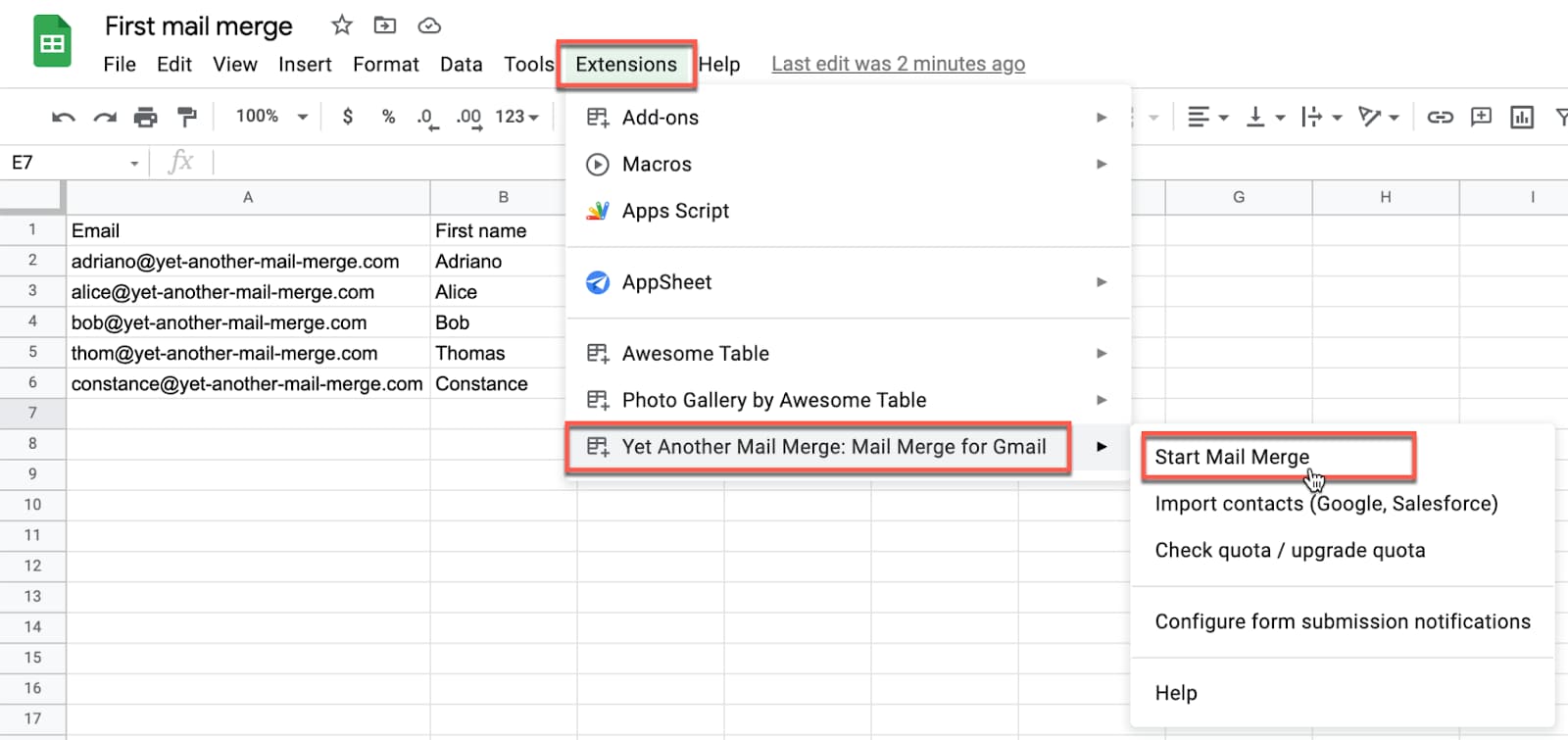
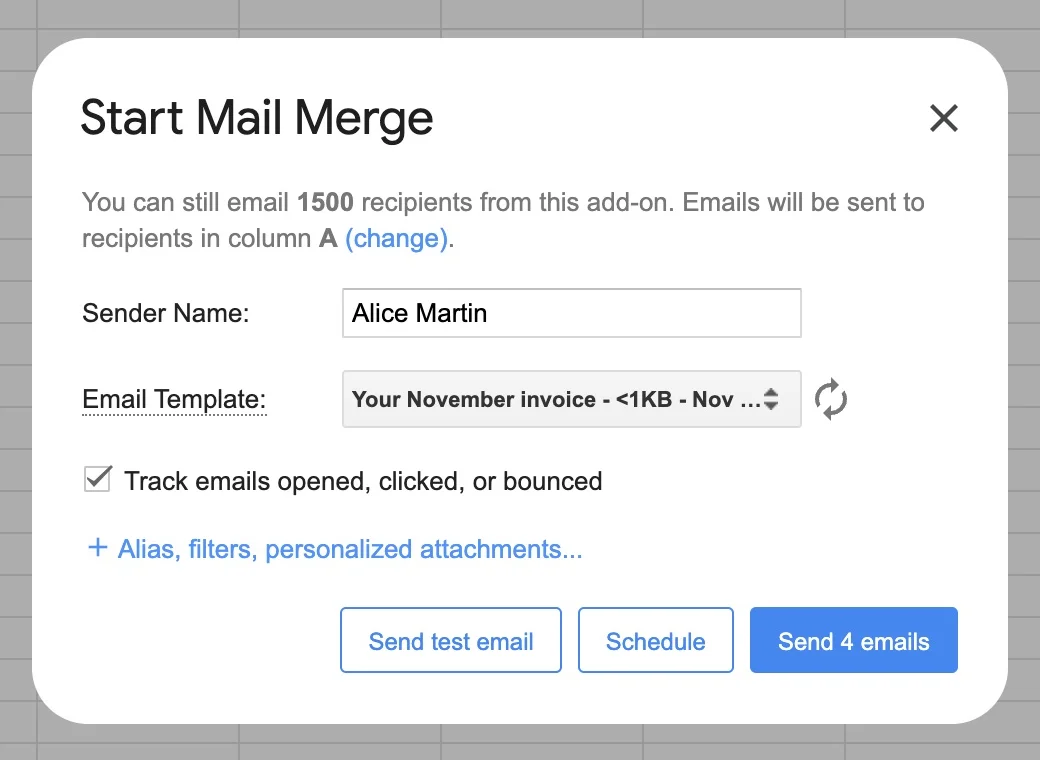
- Open YAMM from the Extensions menu of your spreadsheet (Extensions > Yet Another Mail Merge > Start Mail Merge) and send yourself a test email.
- Click Send emails. Each person gets their own copy, sent from your address.
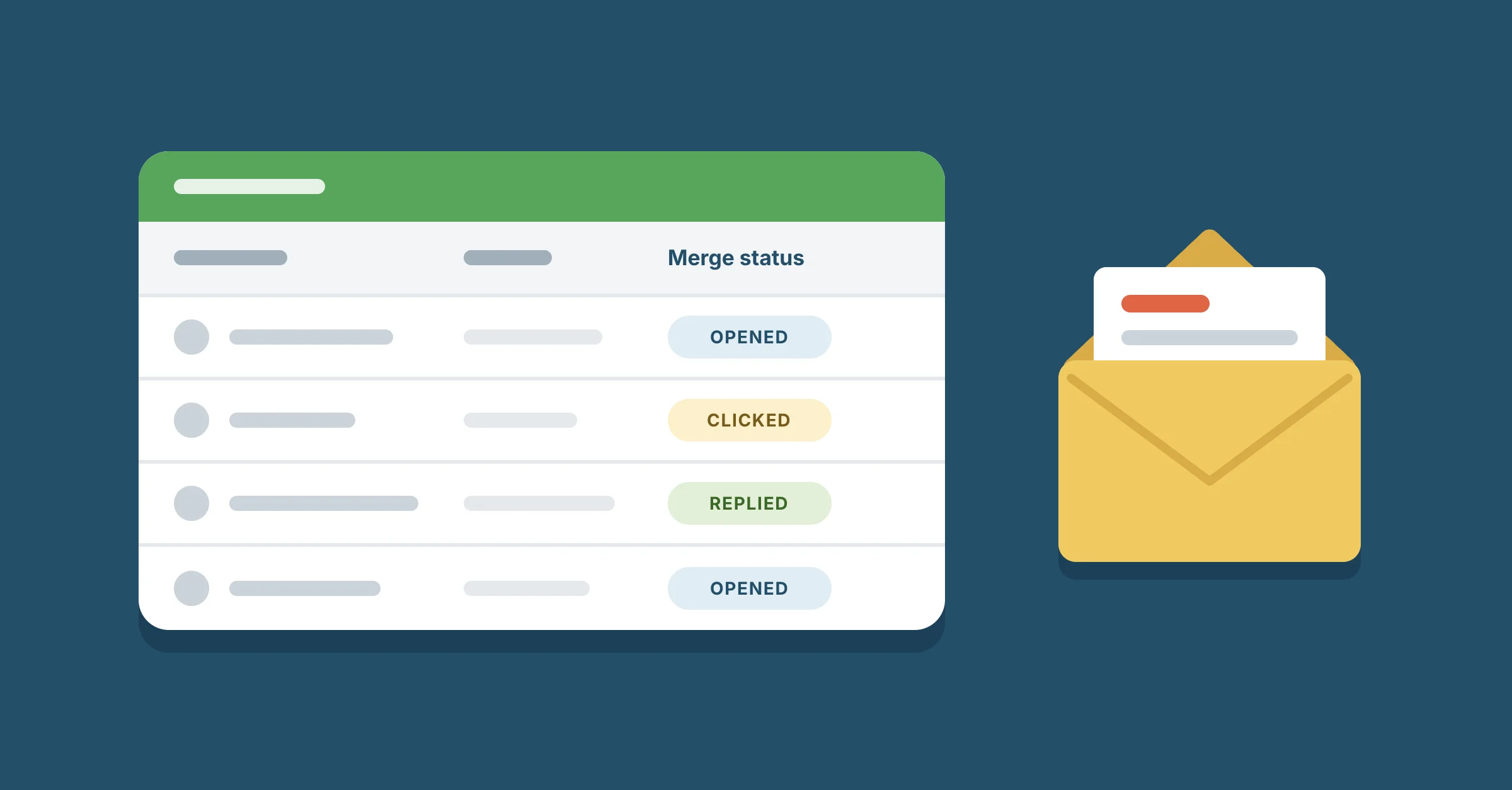
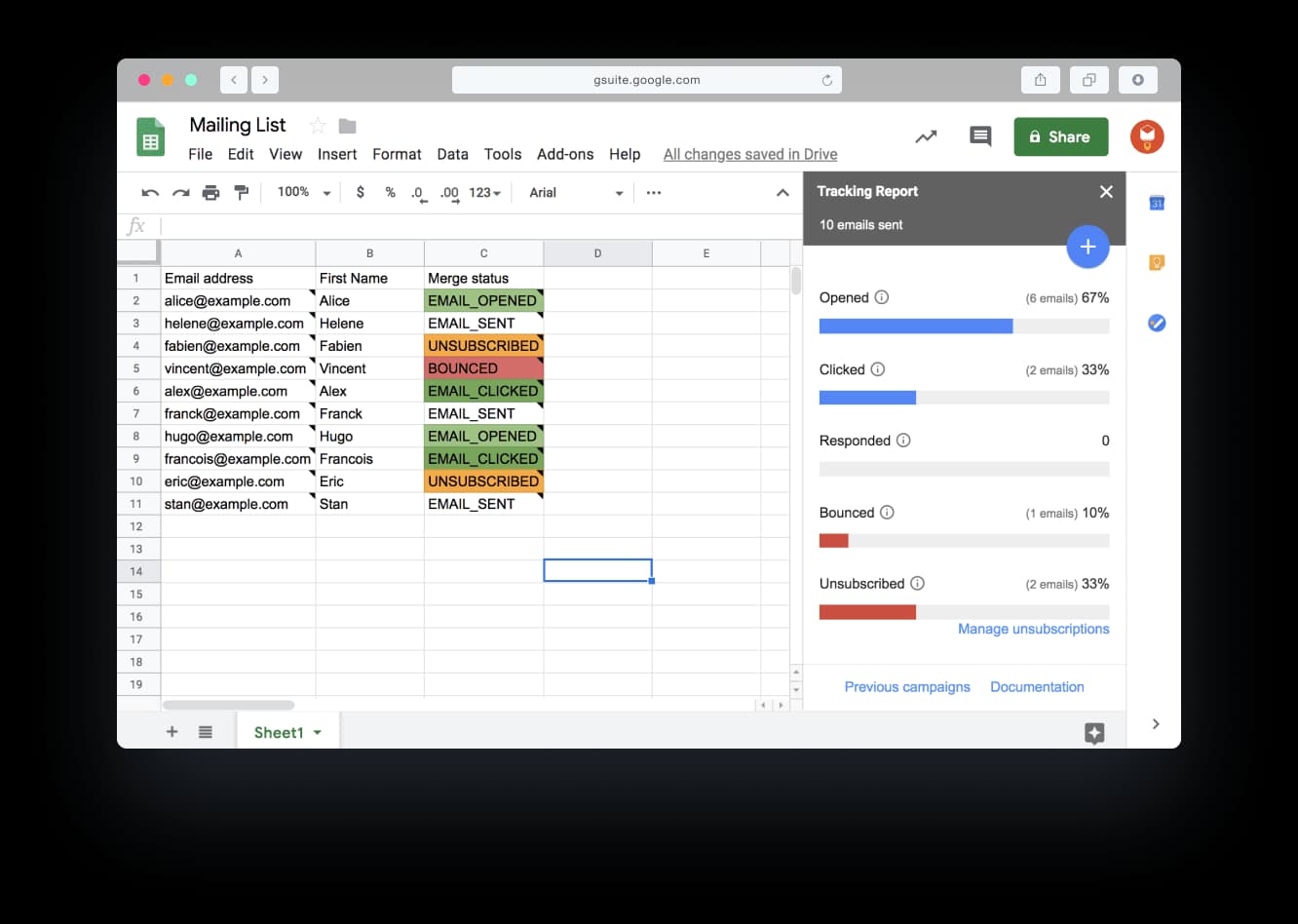
As people read and answer, YAMM writes each person's status in a Merge status column: opened, clicked, responded, bounced or unsubscribed. It does this on every plan, Free included. From the tracking report, you can send a follow-up to the people who didn't open or didn't reply.
Each person can also get their own file from Google Drive, such as an invoice or a certificate, and you don't have to turn on link sharing for the file. Here's how to add an attachment to a mail merge.
YAMM's free plan sends to up to 20 recipients a day. Pro for an @gmail.com account is $72 a year for up to 400 recipients a day, and Pro for a Google Workspace account is $144 a year for up to 1,500. For a team, each Google Workspace seat costs the same $144 a year, for 2 to 100 seats. Those are US prices, and our pricing page shows yours. On Pro, you can schedule a merge for later, and when your list is longer than the day's quota, YAMM offers to send the rest once the quota resets.
Install YAMM from the Google Workspace Marketplace, where it has more than 16 million installs and a 4.7/5 rating from more than 18,000 users.
Other add-ons and extensions for Gmail
Each of these works with Gmail, and each is built around a different job:
- Mailmeteor sends automatic follow-ups on its Premium plan. Besides its Gmail extension and Sheets add-on, it has a Docs add-on and an Excel add-in, so it also works for a list kept in Excel.
- Mail Merge with Attachments can send each person a different file, from Google Drive or your computer, and can send each email at a date and time you set in its row.
- GMass is a Chrome extension that works inside Gmail, for mail merges and cold email campaigns: emails to people who haven't heard from you before.
- Mail Merge by Quicklution works across Docs, Sheets, Forms and Slides. It's built to make letters, envelopes and certificates, and it can send an email each time someone fills in a Google Form.
- Autocrat turns each sheet row into its own PDF or Google Doc from a template, and can email it as an attachment as soon as a Google Form comes in.
- Easy Mail Merge by Ablebits sends from your Gmail drafts and also makes print-ready letters and PDFs from the same rows.
- Streak is a CRM inside Gmail. Its mail merge takes the list from a deal pipeline instead of a sheet, and sends automatic follow-ups.
- Mixmax is for sales teams. It logs emails, opens and replies in Salesforce, and its sequences run a series of emails, calls, tasks and LinkedIn steps until someone replies.
- Mailsuite makes the Mailtrack email tracker, and it sends mail merges from Gmail too.
For the main Gmail tools side by side, with prices, daily limits, tracking and attachments, see the best mail merge for Gmail.
Mail merge programs and add-ins for Word and Outlook
If you write in Word and send from Outlook, you already have a mail merge. In Word, go to Mailings > Start Mail Merge > E-mail Messages, then Finish & Merge > Send E-mail Messages. Word doesn't send the emails itself: it needs an email program installed on your computer, such as Outlook.
On Windows, each person gets their own message, but you can't CC or BCC anyone, and Word can't add attachments, so invoices and certificates are out. Your mailbox also has a daily limit: 10,000 recipients a day for a Microsoft 365 business mailbox, and 5,000 for an Outlook.com account with a Microsoft 365 subscription. And Microsoft says plainly that its business email service "isn't suited to accommodate bulk-mailing scenarios".
These tools fill the gaps Word leaves:
- Standss EmailMerge comes in two versions: EmailMerge for classic Outlook, and EmailMerge 365 for new Outlook, Outlook for Mac and Outlook on the web.
- MAPILab Mail Merge Toolkit keeps Word's mail merge and adds what it lacks: a personal subject line and a personal attachment for each person.
- Easy Mail Merge from outlook-apps.com is an Outlook add-in, not the Ablebits add-on above, and you pay for its license once instead of every month or year.
- Mailbutler runs its mail merge in your Outlook inbox with no Word document, and can take the list from your Outlook contacts, HubSpot, Salesforce or a CSV file.
- Mailmerge365 works in Outlook for Windows, Mac and the web, and spreads a large campaign over several days to stay within Microsoft 365's sending limits.
- Zoho Writer is an online word processor. Its merge makes personalized documents and emails them, in the body or as an attachment, or sends them for e-signature.
Mail merge alternatives: newsletter platforms
Mailchimp, Brevo and HubSpot are email marketing platforms, and your list moves into their account as an audience. Mailchimp's free plan sends 500 emails a month to up to 250 contacts, and every contact you store counts toward the 250, including people who unsubscribed. Brevo's free plan is counted by the day instead: up to 300 emails a day.
A mail merge keeps your list where it is: one email per person, sent from your own mailbox. If you send from Gmail and want to leave a platform, here are Mailchimp alternatives for Gmail users.
Frequently asked questions
Is there a free mail merge?
Yes. YAMM is free for up to 20 recipients a day, from a @gmail.com or Google Workspace account. Mailmeteor and Streak have free plans too. Word's mail merge comes with Word, and Gmail's own mail merge comes with some paid Workspace plans. A free trial isn't a free plan: it ends.
What has replaced mail merge?
Nothing has. Mail merge moved into the tools people already use: add-ons in Google Sheets and Gmail, and the Mailings tab in Word.