How to Follow Up on an Email With No Response
Updated 7 min read
Table of contents
Yes, it's fine to follow up. Wait about three working days, then reply in the same email thread so they see what you asked the first time. Keep it to a few lines with one clear question. Still no answer? Follow up once or twice more, a few days further apart each time, then stop.
Someone who doesn't answer may not be saying no. Your email may be lost under newer ones, or they meant to reply later and forgot. We've all done it. A good follow-up makes answering take ten seconds. The harder part is remembering to send it and, when you wrote to a whole list, knowing who still hasn't answered. Gmail can help with the first, and YAMM with the second.
What to write, with four examples
A follow-up has three parts: one line that reminds them what this is about, your question again, and an easy way to answer. Reply to your first email so the original sits right under it, and keep its subject line. If you start a new email instead, name the topic in the subject, like "Venue for the March 12 dinner", not "Just checking in".
Plain ways to say you haven't heard back:
- "I wanted to make sure this didn't get lost in your inbox."
- "Following up on my email from Tuesday about the venue."
- "Is this still something you'd like to do?"
A request to a colleague or a client
Hi Maya,
Following up on the venue question below. Could you tell me by Thursday whether the 12th still works? A yes or no is all I need.
Thanks,
Sam
After you sent a quote
Hi Daniel,
I'm writing to make sure the quote for the kitchen repairs reached you. Do you have any questions about it? If you'd like to go ahead, reply "go ahead" and I'll book the dates.
Best,
Lea
For a payment that's late, use one of these past-due invoice email templates instead.
A form or an invitation you sent to a group
Hi Anna,
We're still missing a few answers for the school trip on May 3. Could you fill in the form by Friday? It takes a minute: [link to the form]
Thank you,
Mr. Carter
The last follow-up
Hi Priya,
I haven't heard back, so I'll take it that the timing isn't right and stop writing about this. If anything changes, just reply to this email.
All the best,
Tom
The last one tells them you're stopping. It gives people one more easy chance to answer, and it lets you move on.
How many times to follow up, and when to stop
Two or three follow-ups are enough for most emails. Wait longer each time: about three working days before the first, then about a week before the next. That's our advice, not a measured number. We couldn't find a study of the best wait for emails to people who know you.
Does following up get more answers? The numbers we found all come from cold emails, written to strangers. Woodpecker, a cold email tool, reports an average reply rate of about 9% with no follow-up and about 13% with at least one. Strangers owe you nothing, and a reminder still gets some of them to answer.
Stop when someone says no, asks you to stop or unsubscribes. Otherwise, make your second or third follow-up the "last follow-up" example above, then move on.
Let Gmail remind you to follow up
The risk with a single email is that you forget. Two Gmail features help.
Nudges. In Gmail, click Settings > See all settings. On the General tab, next to Nudges, check "Suggest emails to follow up on" and click Save Changes. Gmail may then show sent emails you might need to follow up on at the top of your inbox. Nudges need conversation view turned on, and Google doesn't say how many days it waits before it shows one. Google's help page on nudges has the details.
Schedule send. Write the follow-up now and let Gmail send it later. Click the down arrow next to Send, then Schedule send, and pick a day. If they reply first, open the Scheduled label and click Cancel send: the email goes back to your drafts. You can have up to 100 scheduled emails, Google says.
Follow up with everyone on a list who didn't reply
When you've emailed 40 parents, 25 clients or your whole team, following up by hand means opening every thread to see who answered. With YAMM, the mail merge add-on for Gmail and Google Sheets, your sheet already knows: every reply, open and click is written next to the person's row. When you're ready, YAMM sends your follow-up only to the people you pick, from your own Gmail account.
Your first email needs tracking turned on. If you haven't sent it yet, here's how to send a personalized email to a list from Gmail.
- Write the follow-up as a new Gmail draft.
- Open the Google Sheet you sent from, and select Extensions > Yet Another Mail Merge: Mail Merge for Gmail > Open tracking report.
- In the tracking report, click the + button.
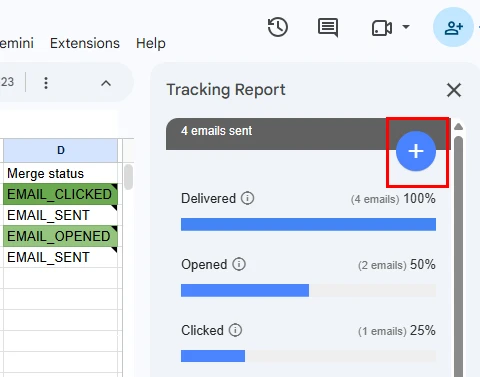
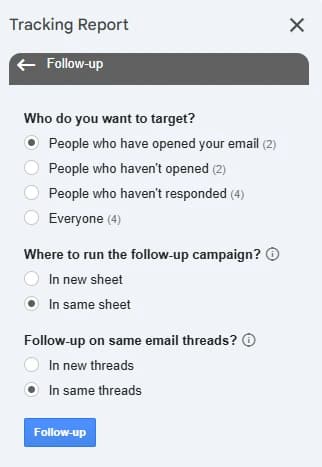
- Choose who gets the follow-up, where to track it and whether it lands in the same thread, then click Follow-up. Each audience shows how many people it matches.
- Select your follow-up draft as the email template and click Send emails.
People whose email bounced or who unsubscribed never get a follow-up, whatever you pick. To leave someone out, like a parent who already answered by phone, type 0 in their Merge status cell before you start.
In step 4, pick "In new sheet" if you want your first email's sheet and tracking report left as they are: YAMM copies the people you picked to a new sheet and tracks the follow-up there.
Who should get the follow-up?
| Option | Who it reaches | Pick it when |
|---|---|---|
| People who haven't responded | Everyone who hasn't replied, whether they opened your email or not | You asked a question or need an answer. This is most follow-ups. |
| People who haven't opened | Only people with no open, click or reply recorded | Your news needs no answer, only to be seen |
| People who have opened | People who opened, clicked or replied | You have more details for people who showed interest |
| Everyone | Everyone your first email reached | Something changed that everyone needs to know, like a new date |
"Haven't responded" is usually the safer pick, because open tracking isn't always accurate. Apple's Mail Privacy Protection, for one, stops senders from seeing whether you opened their email. A reply is a real answer.
Watch out for out-of-office replies. YAMM can't tell an auto-reply from a real reply, so both count as a reply, and someone who's on holiday won't get this follow-up. Look at the RESPONDED rows in your sheet, and write to anyone whose only reply was an auto-reply when they're back.
Keep the follow-up in the same thread
Pick "In same threads" and your follow-up arrives as a reply under your first email, so each person sees what you asked. Gmail decides what goes in a thread: it starts a new conversation when the subject line changes, and YAMM can't override that. Our help page lists what keeps a follow-up in the same thread:
- Keep the same subject line. Adding "Re:" at the start is fine.
- Send from the same Google account. An alias of that account works too.
- Send to the same addresses. You can add new people in cc.
- Don't use personalized attachments. Attach the file to your draft instead.
If the subject line differs, the follow-up still goes out, but as a new email. The follow-up help page covers every option.