Open rate
The tracking report displays your campaign open rate in real time. This article covers how to track opens, how to interpret an unusually low or high rate, and tips to increase your open rate.
Track if your emails have been opened
Open rate tracking lets you see if your subscribers have opened your emails from their inbox. This metric is influenced mostly by the attractiveness of your subject line.
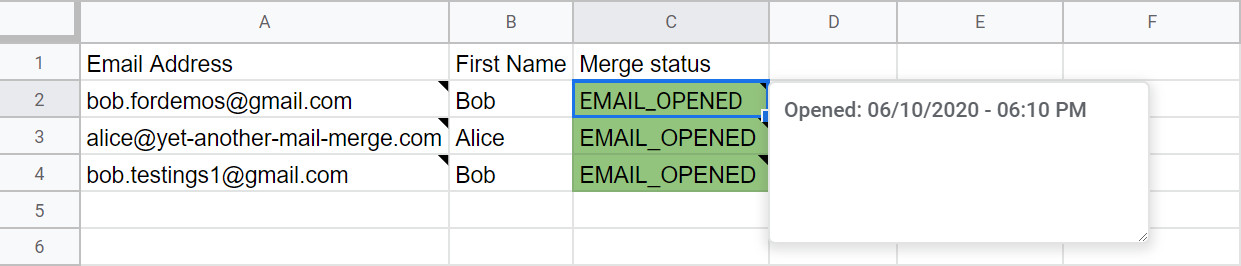
After enabling tracking and running a mail merge, you can see in your spreadsheet that the status changed from EMAIL_SENT to EMAIL_OPENED for each email opened (under the Merge status column).
A tooltip in the merge status cell also indicates when the email was opened.
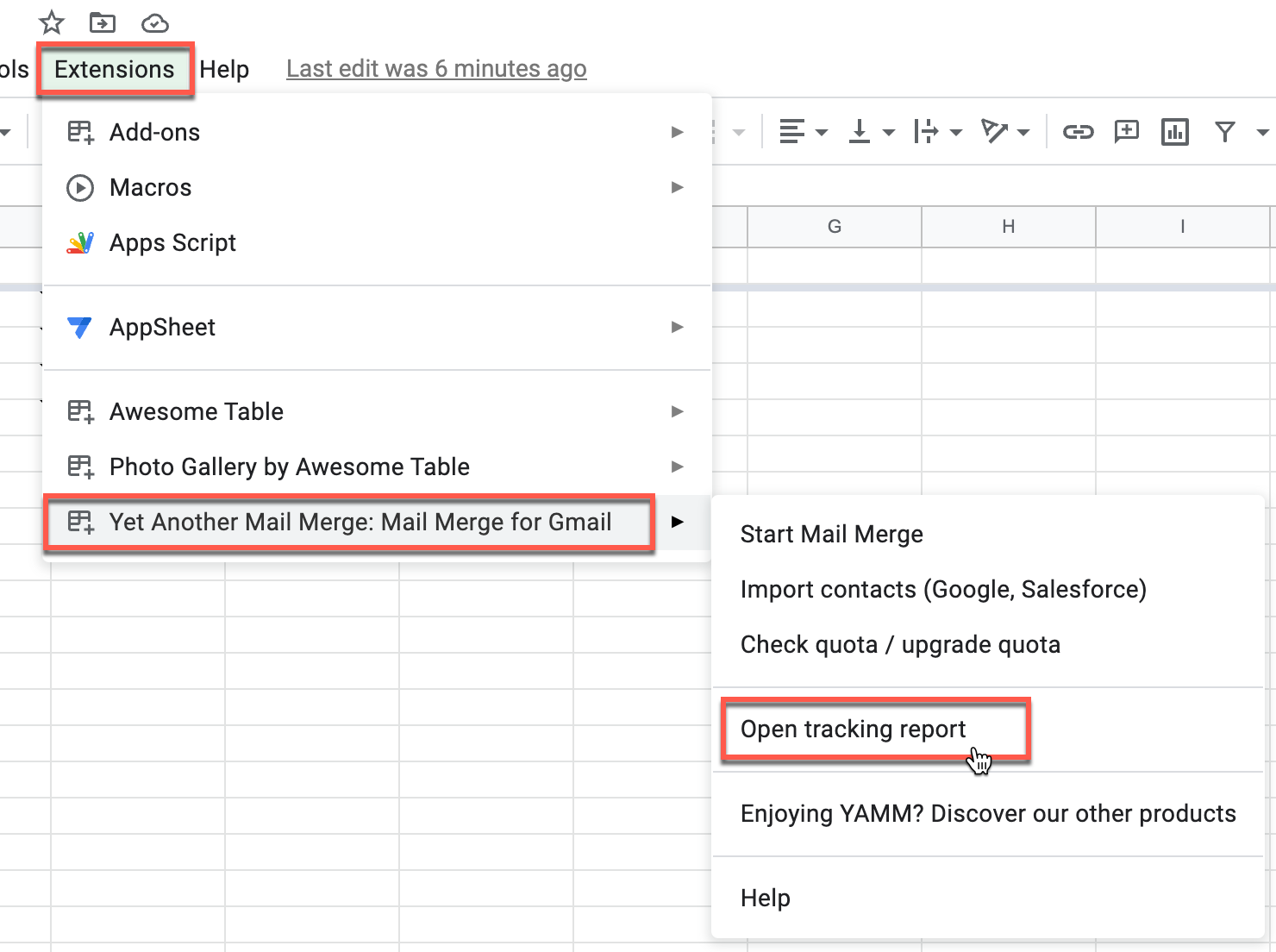
If you close your contact list spreadsheet, you can open the tracking report again by going to Extensions > Yet Another Mail Merge > Open tracking report.
How does YAMM track an opened email?
YAMM embeds a tiny, invisible tracking image (a single-pixel gif, sometimes called a web beacon) within the content of each message. When the recipient opens the message, the tracking image is scanned, referenced and recorded in our system.
The calculation of the Opened status is based on the following: Open rate = opened / delivered.
Open rate seems unusually low or non-existent
If your open rate is very low, it doesn't necessarily mean your campaign was unsuccessful. Possible causes:
-
Tracking was not enabled. See enabling tracking.
-
You haven't waited long enough. The open rate tends to increase significantly only after a few hours.
-
Your recipients didn't activate image display in their webmail client settings. In most email services, like Gmail, people can disable the display of images by default. YAMM uses an invisible pixel to track opens, so if your recipients don't display external images, opens are not recorded. Recipients can explicitly ask Gmail to display all images from your email:

-
Your emails fell into your recipients' spam folder or bounced. See tips to reduce bounce rate.
-
You deleted the YAMM-ID related to each recipient. Learn more: Sheet not linked to mail merge.
-
Your email is above 102KB. Gmail hides the bottom of your message. The tracking pixel is located at the end of the email and is not recorded unless the recipient clicks View Entire Message.
-
You are trying to track on a copy of your spreadsheet. Tracking can't work on a copy — use the original spreadsheet.
-
You are using Internet Explorer. Tracking can't be updated on IE. Try another browser like Google Chrome.
-
Your recipients are using an email tracking blocker. YAMM can't do anything unless they disable the blocker.
Open rate is unusually high
Your open rate is very high, or the results appear only a few seconds after you launched your campaign? A very high open rate that happens right after sending doesn't necessarily indicate that your campaign is 100% successful.
Most common causes:
| Cause | Explanation |
|---|---|
| Opening your emails from the 'Sent' folder | If you open emails from your Gmail 'Sent' folder, that is considered as a read. |
| Opening bounced messages from your inbox | The bounce notification contains the email you sent, so it counts as read too. Archive bounces without reading them to avoid skewing the results. |
| Your subscribers forwarded your email | When forward recipients open the email, tracking records it. There is no way to prevent this. |
| Your cc/bcc recipients opened your email | The same email is sent to everyone, so YAMM can't differentiate between the primary recipient and the cc/bcc ones. Learn more: Reach multiple recipients per row. |
| Aggressive spam filters | They open or click links in incoming mail before delivering, to check for malicious content. YAMM tracks those clicks as opens. See anti-spam tips. |
| Preview pane feature enabled | Every time the email is scrolled to in the preview pane and images download, an additional open is recorded. Turn off the preview pane. |
| Pre-opening by the email service provider | Some providers, like Gmail, pre-open emails they receive, triggering open detection. Learn more. |
If you need further help, send us a request so the support team can investigate.
Tips: how to increase your open rate
Your subscribers may get dozens of emails every day. To get their attention, focus on the subject line and the first lines of your email body.
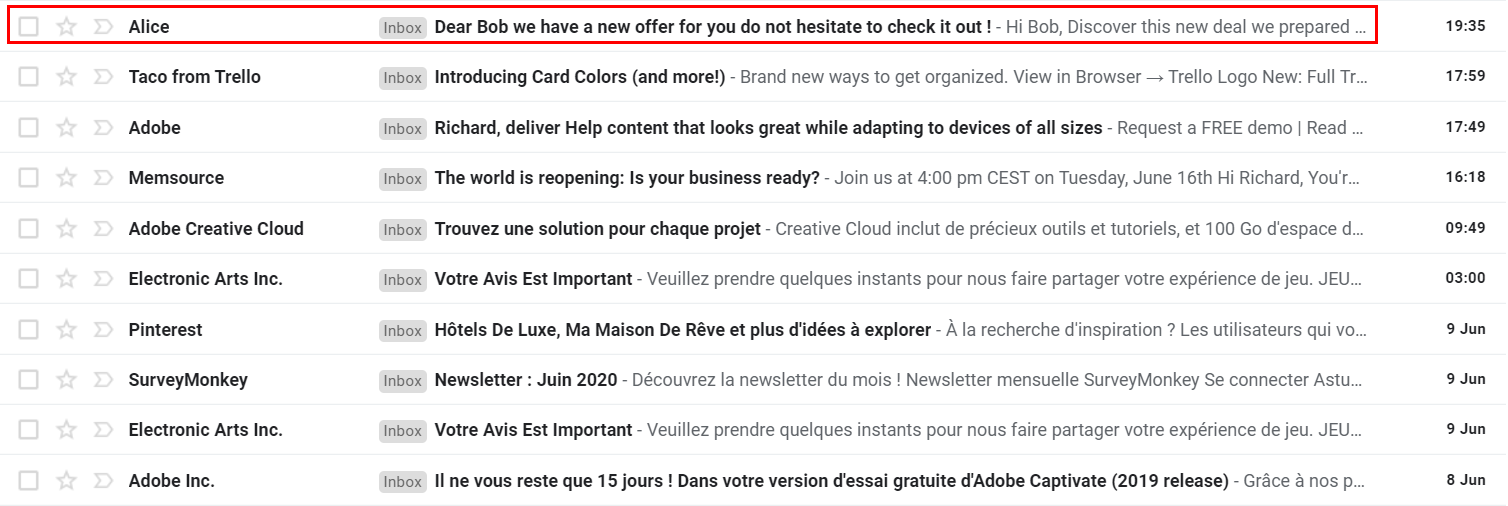
A catchy subject line
- Tell the truth.
- Aim for about 50 characters — not too long, but not too short ("Hello man" isn't enough).
- Be clear and direct — avoid complex or fashionable words.
- Personalize whenever possible (use the recipient's name).
- Avoid aggressive colors and capital letters (often flagged as spam).
- Use exclamation marks sparingly.
- Check for typos.
- Don't forget the subject line itself!
Test your campaign and improve it
A/B test smaller segments to find what works:
- Change the subject line (WordStream's tips).
- Modify the design or template.
- Try a different body content.
- Vary the day and time you send (morning vs. afternoon, day of the week, etc.).
Test one variable at a time so the comparison is meaningful.