Avoid spam issues
When you launch big mass-emailing campaigns regularly, you'll face spam issues at some point. This article covers what spam is and the anti-spam rules that keep your campaigns deliverable.
What is spam?
A spam (or junk email) is usually defined as an unsolicited, undesired, or illegal email, most often sent in big batches via a mail merge tool.
Using YAMM for emailing campaigns is legal; spamming is not.
The most common example is the salesperson who purchases an email list online and emails the contacts with a targeted message hoping they'll become prospects. Why is this bad? The recipients never agreed to receive emails from the salesperson. Google (or other webmail providers) consider this activity as suspicious. Repeated spam behavior harms your account or domain reputation — and Google may block your account.
From a legal standpoint
Spam laws vary by country. Always apply two key rules:
- Never use deceptive reply-to addresses, subject lines, or names.
- Always include a valid unsubscribe link in your emails.
From a technical standpoint
Beyond legal requirements, your emails also have to get past spam filters and avoid triggering complaints from recipients.
Spam filters
Spam filters consider several criteria:
- Your email header (metadata): Date, From, To, Subject. Filters check whether recipients know you, so use a verified domain, personalize the subject, ask permission.
- Your IP address: If you've spammed people before, filters remember and flag your future campaigns.
- The HTML code: Unstructured HTML is suspect. Sloppy code can be inserted by copying from Word or Google Docs, so use one of the recommended methods to Draft your template.
- Email content and formatting: Specific words, aggressive colors (red), typography (capital letters, exclamation marks) may trigger filters. Keep content clear and consistent with the subject line.
Abuse report
People can flag any email as spam with one click.

Sometimes people accidentally mark an email as spam when they only wanted to unsubscribe. To avoid this, always include an unsubscribe link.
How to avoid being flagged as spam
The rules below summarize the main practices that reduce your chance of being blocked by Google or getting spam complaints. Also check Google's Bulk Sender Guidelines, which set specific requirements for messages delivered to @gmail.com / @googlemail.com inboxes.
Set a valid SPF record (Google Workspace)
This section applies if you send with a Google Workspace account. Not sure if your account is Google Workspace or personal Gmail? See Account types.
SPF (RFC7208) is an email authentication protocol that allows the owner of a domain to specify which mail servers are authorized to send mail from that domain. If your domain doesn't have a valid SPF record, your emails are more likely to be flagged as spam.
You can also check your domain's configuration yourself using Google Admin Toolbox. If you see the following message, your domain doesn't have a valid SPF record for Google mail servers, and some recipient domains may reject messages from your users.

If you are the owner of your domain's DNS settings, you can configure the SPF record yourself. Otherwise, ask your Workspace admin or IT team to do it. See Google's documentation on SPF records.
Warm up your Google account
Google carefully monitors usage on new Google Workspace or Gmail accounts.
- Start with a small list (e.g., fewer than 50 emails).
- Track the mini-campaign to see how recipients react.
If you receive a lot of bounces, double-check your contact list. Your database may be outdated or not legitimate. See Bounce rate.
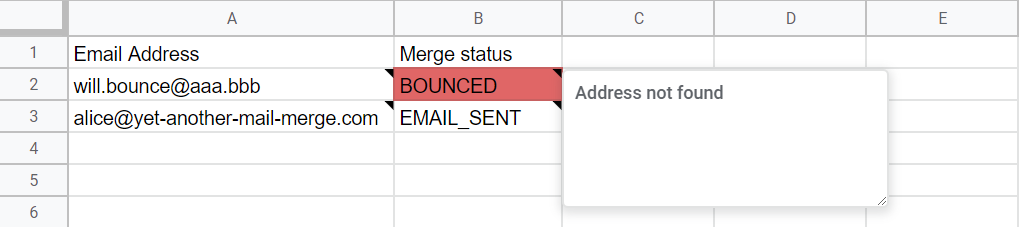
Skipping the warm-up or ramping up volume too fast can get your account blocked . See My account has been blocked by Google.
Use double opt-in
Double opt-in gets you explicit authorization: after someone signs up on your website, send a confirmation email with a link they must click to activate their subscription. This confirms the address is valid and reduces bounces.
Don't purchase email lists
Most lists of addresses sold online are collected without the owners' consent, or even their knowledge. Emailing such a list gets you marked as spam, generates abuse reports, and permanently damages your domain reputation.
Don't assume people gave permission
Ask customers directly for permission, whether through a paper form at a trade fair or a subscription checkbox at signup on your website. Public contact details (LinkedIn, social media) aren't permission to send promotional emails.
Set expectations for your emails
Tell subscribers what to expect: how often they'll hear from you (weekly, monthly) and what topics you'll cover. Then stick to it — sending too many emails or off-topic content erodes the trust that got them to subscribe in the first place.
Don't wait too long to contact subscribers
Transactional emails (welcome, purchase confirmation) follow immediately after the trigger action. Newsletters and bulk emails need to be planned. If your first newsletter arrives 6 months after the last purchase, subscribers will have forgotten you and flag the email as spam or unsubscribe.
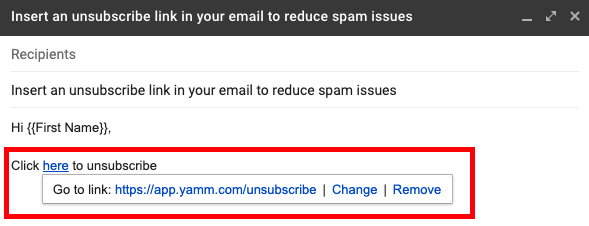
Insert a clear unsubscribe link
Insert a clear unsubscribe link. Unsubscribers reduce campaign size, but the impact is mild. Without an obvious way to unsubscribe, recipients hit the Mark as Spam button instead, which damages your domain reputation.
Be consistent with your brand image
Keep design guidelines, logo, tone, and messaging consistent across emails so subscribers recognize you. Drifting from your brand image confuses recipients and reduces engagement.
Clean up and organize your contact list
Update your contact list regularly by removing bounced, inactive, or unengaged addresses. Emailing a stale list drives up bounce rates, which lowers your open rates and can get your Google account blocked. See My account has been blocked by Google.
Segment your list instead of emailing everyone the same way: group subscribers by how they signed up, what they're interested in, or how recently they've engaged, and tailor each campaign to the group.