You have a formula/script in your spreadsheet and YAMM doesn't send your emails
If you have enough quota, but YAMM can't send your emails, it is probably because of formulas or scripts behind your cells. Please remove them to see if that helps.
Why does YAMM refuse to send your emails?
Sometimes you need to retrieve data from another source (spreadsheet, CRM etc.) before starting your mail merge. To do so, you might have used a particular add-on or a formula from Google Sheet such as 'Vlookup' (or a more complicated one).
Therefore, your spreadsheet may be filled with cells containing a lot of heavy formulas, which can cause trouble to Yet Another Mail Merge:
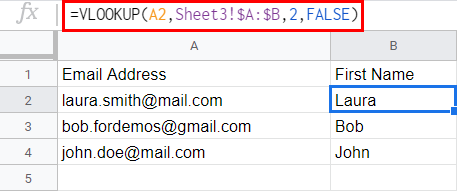
To ensure that you won't have any issues sending emails, the best thing to do before using YAMM is to delete the formulas so that your spreadsheet contains only values (or raw text).
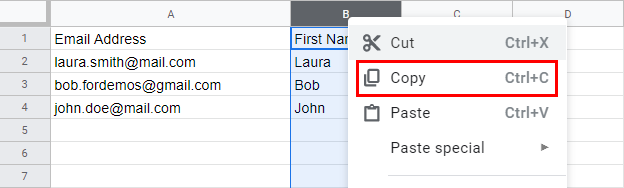
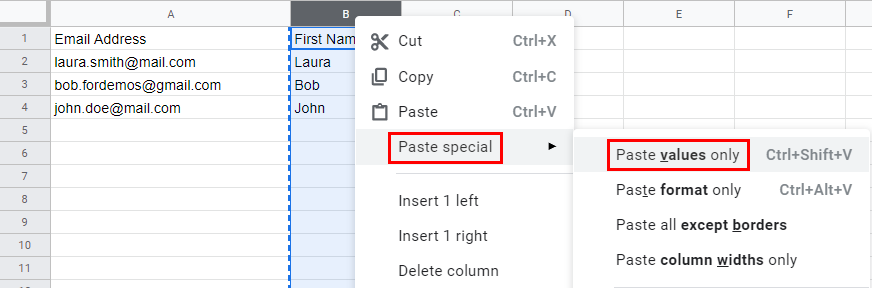
Select the column(s) that contains formulas, copy it, and paste its values only:
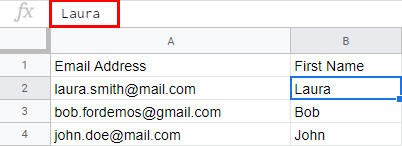
Your column does not contain formulas anymore.
Note: If you still want to keep your formula/script, we advise you to make a copy of your spreadsheet, then remove the formula on the new one, and finally start your mail merge on this copy.