Some rows / recipients are missing in my spreadsheet
After sending a campaign, some rows seem to have disappeared. No worries, read this article to know why and how to solve this issue.
What is this issue?
Once you sent your mail merge, you notice that some rows are missing from your spreadsheet.
That usually happens when:
-
You segmented your contact list to send your emails to specific recipients (learn more)
-
You clicked on a cell 'opened', 'clicked' etc. from the tracking sidebar (learn more)
Example
Before sending your campaign, here's what your spreadsheet looks like:
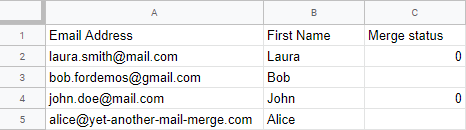
After sending your campaign, some rows are missing (those with 0 under the Merge status).

What should I do?
Your rows have been filtered. Note that there's no option in YAMM to remove rows, so your data is still on your Google Sheets.
Turn off the filters and all your rows will appear again!
Click on the filter button from the spreadsheet toolbar to turn off the filter views.
