Quota issues
Questions and solutions about your YAMM sending limit. The daily quota you can use depends on your YAMM plan and your Google account type. If you are unsure which type you have, see Account types.
Why is your quota lower than expected?
If you have a Pro plan but are limited to 400 recipients per 24 hours, it's likely because your Google Workspace account is in a free trial or warm-up period. Google progressively increases sending limits for new Workspace accounts before they reach full capacity.
| Stage | Recipients per 24 hours | Duration |
|---|---|---|
| Free trial | 400 | 14 days |
| Warm-up period | 400 | See below |
| Full capacity | 1,500 | — |
The warm-up period ends automatically once your domain has been billed USD 100 (or equivalent) in total. After your domain reaches this payment threshold, it can take up to 75 days for Google to increase your sending limit.
This can take a significant amount of time and is entirely due to Google restrictions. Contact Google Support directly if you have further questions.
Learn more: Gmail sending limits in Google Workspace
Other common reasons
| Reason | Explanation | Learn more |
|---|---|---|
| Adding cc/bcc recipients | All recipients — including cc and bcc — count toward your quota. | Reach multiple recipients per row |
| Personalized attachments | If you have a Free plan, a Pro @gmail.com account, or a Pro Google Workspace account under a trial or warm-up period, you are limited to 100 recipients per 24 hours when sending personalized attachments. | Add personalized attachments to your emails |
| Using other applications | Your quota is shared with other add-ons and scripts. Avoid using other applications to send emails, attachments, or reminders while using YAMM. | |
| Using the wrong Google account | If you are signed into multiple Google accounts in the same browser, make sure you are using the correct one before sending. | Log out from multiple accounts |
| Using the old Google Apps legacy free edition | This edition is limited to 100 recipients per user per day. | Google Apps legacy free edition / Quotas for Google Services |
If none of the above applies to you, send us a request and our team will investigate.
Log out from multiple accounts
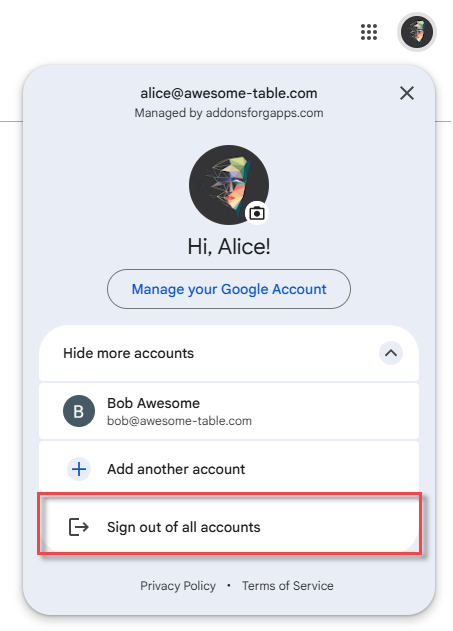
If several Google accounts are signed in to the same browser session, YAMM runs into quota issues, freezes, and duplicated emails. Sign out of all of them, then log back in with the one account you want YAMM to use.
-
Open your Gmail account.
-
Select the icon at the top right and click Sign out of all accounts.
-
Click Sign in and select the account you want to use YAMM with.
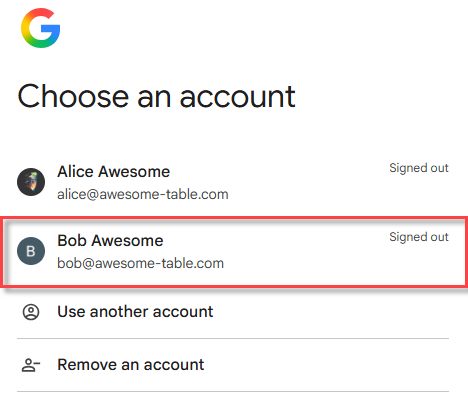
You are now logged in with one single Google account and can start using YAMM.
To avoid the problem for good, create a browser profile for each Google account so each account keeps its own browser session.
I don't have enough quota to complete my mail merge
If you don't have enough quota because you've already sent some emails in the past 24 hours or because your campaign is too big, you'll have two options depending on your plan.
Pro plan
If you bought a plan for Yet Another Mail Merge, and don't have enough quota to send right away your whole campaign, you will get the following warning:
You don't have enough quota to send all emails now. But YAMM can automatically send remaining emails later.
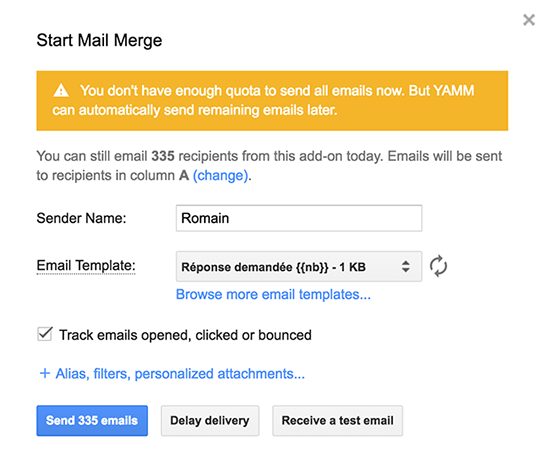
Recommended action: Let YAMM schedule the remaining emails for when your quota resets.
Free plan
In case you're on a Free plan, you will get the following warning:
You don't have enough quota to send all emails now.
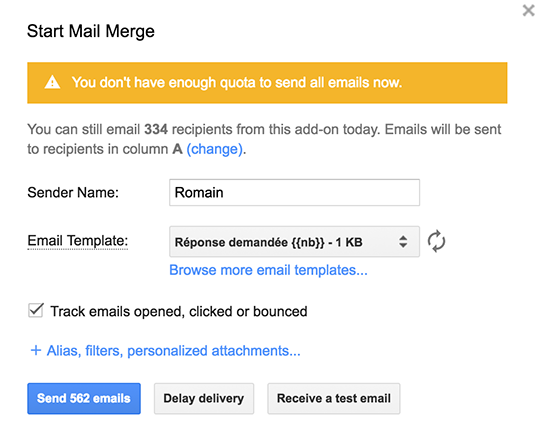
Recommended action: You can only use your remaining quota now, and you will have to relaunch your YAMM 24 hours later when your quota resets to send to the rest of your list.